
Chapter 1
Making it fit your wheel
Wheelly is not a single object: it is a set of generators that draw the parts around the wheel you actually own. The page in this chapter is where you tell them what that wheel is - its diameter, how many filters it holds, which magnet you glued on - and everything downstream, from the printed parts to the drawings, follows from it.
If you are building on the same wheel this project was drawn around - a Ø158 mm manual filter wheel - and you are using the same Ø8 × 1 mm diametral magnet, you can skip straight to the next chapter: the parts as published already fit, and the numbers on this page are the ones they were generated from.
What you need
Parts
Tools
- a computer with Python 3.12
- a web browser
- a caliper, for the one measurement that goes back into the model
Step 1 Get the generators running
- The parts are not STL files that happen to exist: they are generated, and to change one you run the generator. You need Python 3.12 and two libraries - CadQuery, which builds the solids, and ezdxf, which writes the drawings.
- From the repository: `cd mechanics/wheelly-cad`, then `uv venv --python python3.12 .venv` and `VIRTUAL_ENV=.venv uv pip install cadquery ezdxf`. Plain `python -m venv` and `pip install cadquery ezdxf` work as well, just slower.
- Always call the interpreter inside `.venv`, never the system one: `./.venv/bin/python`. The system Python has neither library, and the error it gives you points at the wrong thing.
Step 2 Open the page
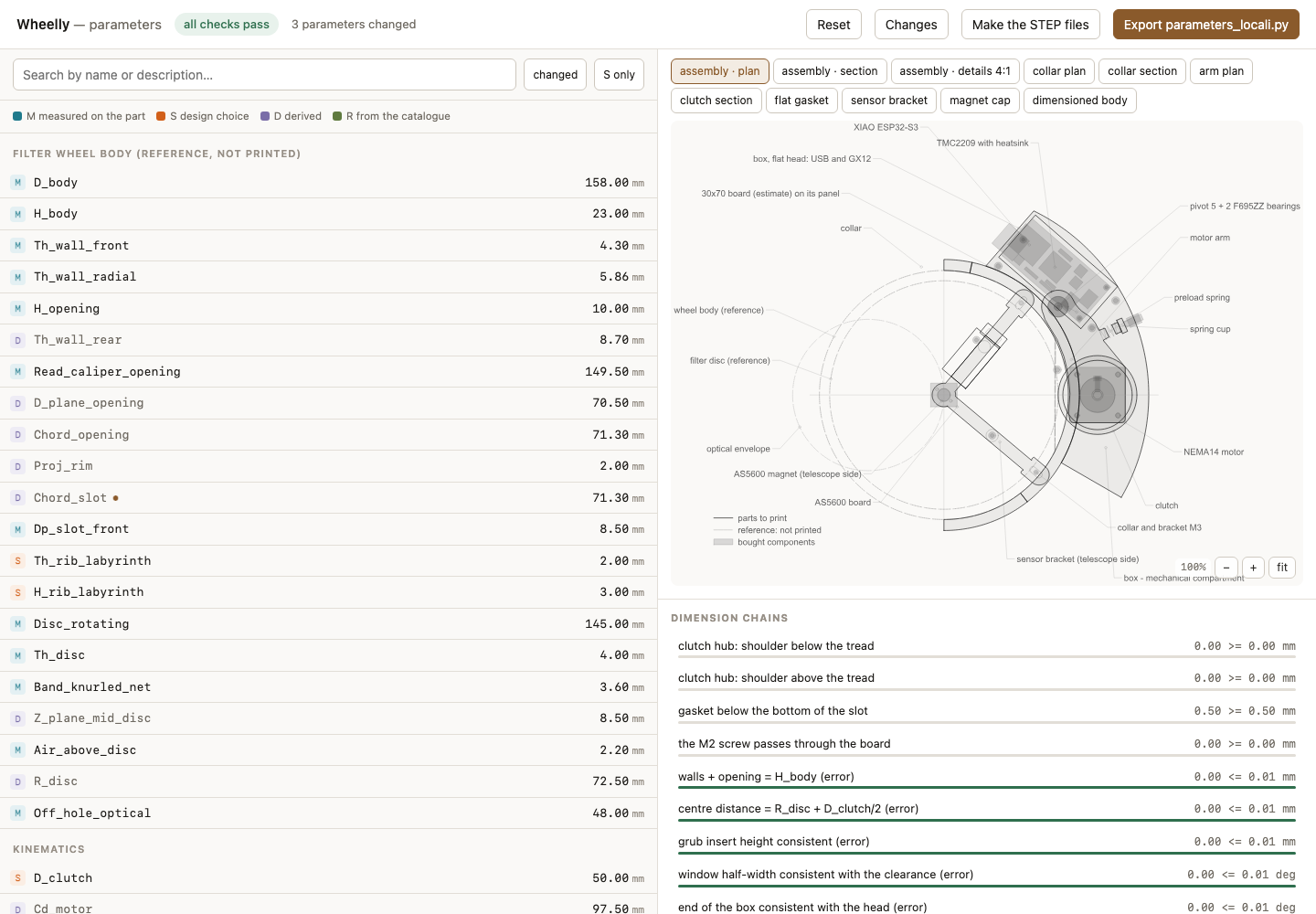
- `./.venv/bin/python ui.py` opens the editor on http://127.0.0.1:8760/ and brings up a browser. `--porta N` puts it somewhere else, `--no-apri` leaves the browser alone - which is what you want over SSH.
- The page lists every parameter in sections, with what it means, where it is used, and whether it was measured on a real part, declared by a supplier, or assumed. That last column is worth reading before you trust a number: most of the defects this project has found came from assumed values nobody checked.
- The page does not reload the files by itself. Change a generator or a parameter on disk and you must restart it - otherwise you are looking at the values it read when it started, and they will disagree with what the build produces.
- The drawing on the right redraws as you type, and under it the dimensional chains show what each change did to the fits that matter - shaft engagement, gasket squeeze, whether the M2 screw still passes. A change that breaks one turns red there, before you have printed anything.
Step 3 Change what you need, and only that
- Edits go into `src/parameters_local.py`, which overrides `src/parameters.py` and leaves the base untouched. That way your wheel and the reference wheel stay side by side, and a future update of the project does not silently take your numbers away.
- The ones that matter for a different wheel are the rotating disc diameter, the number of filter positions, and the magnet - diameter and thickness. Change the magnet and the sensor bracket moves with it: the air gap is a consequence, not a setting.
- Everything else has a default that works. A parameter you do not understand is a parameter you should leave alone - each one says which parts depend on it, and some feed six.
Step 4 Build, and check it built
- `./.venv/bin/python build.py` regenerates everything: solids, drawings and the checks. It takes about twenty minutes.
- `./.venv/bin/python build.py --solo-dxf` does the 2D geometry only, in seconds. Use it while you iterate on a dimension, and the full build to confirm nothing now collides.
- Read the end of the build before you print. The checks are the point: they measure the solids that came out and say whether parts intersect, whether screws still reach, whether the wheel still clears the box. A build that ended in an error leaves the previous STEP files on disk, and they look exactly like good ones.
- The parts to print come out in `out/`, and nothing else does: `out/tools/` holds the test jigs and `out/drawings/` the drawings. Opening one folder to send a job is how a jig gets printed instead of a part, and that costs an hour.